

Good news - accessing and editing your account and profile settings just got a whole lot easier!

We recently launched the completely redesigned Account Edit Settings page which is the new one-stop control center for Archinect users to manage their account and (if applicable) profiles, blogs, job ads, job applications, and Talent Finder subscriptions. We consolidated and simplified a number of separate pages into one easy-to-use page where following adjustments are now just one click away:
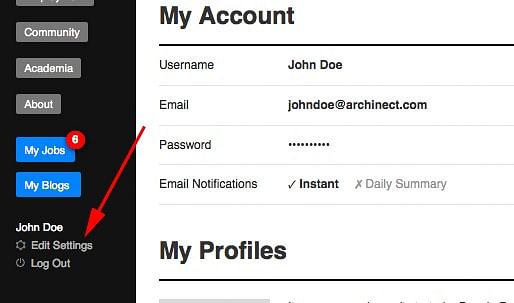
You can access the new Account Settings page by clicking the 'Edit Settings' button which is right above the 'Log Out' button in the main navigation column on the left of all Archinect pages.

This blog is intended to keep a brief record of not-so-obvious updates and changes to Archinect.



13 Comments
The only thing I can't figure out how to do is delete my profile entirely. How do I do that?
Just send us an email and we can take care of that for you.
I'd like to do the same please.
any way to copy a project profile from your firm to your personal portfolio and vice versa without re-entering the whole thing?
Steven - no, we don't have a feature like that. Typically, projects posted to individuals profiles are different types of projects than projects posted to firm/company profiles, so it isn't something we have considered investing in developing. We do understand, however, that it would be very helpful feature to a few people.
thanks! and you're right, what i would put in one place is (mostly) different from the other. but there have been a couple times i've been interested in putting something both places.
Hey - so I've got a question for you about the blogs - is there any way to see the metrics (views, where, etc) for my own? I have people telling me they read it in the strangest places, but I'd be curious to see a kind of dashboard for it.
Gregory - we don't currently have stats for blogs, but we've considered adding a daily visitor statistics chart. We currently have that for the job ads.
Is it possible to edit a comment after its been posted? I want to regularly update my comment as I get more admission decisions. Thanks
How do I update my profile picture and resume? I don't see that as an option under Settings: My Profile. Thanks.
You can access this from your settings page as long as you were logged in with the same account that you used to set up your profile. Another way to quickly do this is to go to your profile and click any of the blue edit icon to edit your profile photo and resume.
Hi, how can I find a post that I created on the forum? Do I get notifications when someone replies me?
Click on your own history and cycle through your previous comments.
Hi, the profile of my firm was initially set up by a member who no longer works here. I "flagged" it but nothing's happened. How can I set myself up as a new admin on my company profile?
When you flag a profile it needs to be reviewed by an admin. You flagged your profile at the same time as posting this comment. An admin has since reviewed your flag and responded to you via email.
Re: finding old posts ... is there a limit to how far back I can see in my comment history? For example, I can't get back further than yesterday in my own comment history, but on other users, I can see much farther back ... but maybe it is about the same number of comments. I know I've been able to go back further in my own history at times as well. Any ideas on what might be my limiting factor here?
Everyone can see their entire post history and comment history, as well as the history of others. This is specific to the real name or username. For example, if you click the history link for a user when s/he is posting with their real name, this history will not include the posts/comments made when posting as their username (not their real name).
It seems to be showing my entire history now, but yesterday it wouldn't load more comments when I scrolled to the bottom of the history ... or it would load a few times then stop loading more. It seems to be an issue the more posts that get loaded. For example, today I can get back to the first comment I made under this account seeing all 400 of my comments, but I just tried Steven Ward's history (as he was the first one I clicked on above). It will only load his comment history for me back to May 6, 14 6:09 am. I haven't counted but I'm certain this is not all 11,186 of his comments. I think there is a decade of his comments it isn't showing me.
There's probably a max number of comments or date range set when viewing comment history.
So what you stated in your first reply--everyone can see their entire post history and comment history, as well as the history of others--is not entirely correct then, or is there a way to see past the max number or date range? Do you know what the max number or range is set to? Is that a setting that can be opened up or changed to allow someone to see more of their history, or the history of others?
If there is a predefined max number of entries in a user's history list then that was a decision made during the development of the site, many years ago. It's unlikely we'll change that setting considering this is the first time anyone has ever requested it. Are you looking for a specific comment or post?
Not looking for anything specifically anymore, I was able to find it yesterday. It was just frustrating me that I wasn't able to go back further on my history, but on others I could. Today it lets me go back on my history, but not as far back on others. Even playing around in the histories today, some seem to let me keep scrolling and scrolling, and others stop loading additional comments at some point. Maybe there is a logic to it, but I'm not seeing it.
Still running into issues with this; not being able to see all of a user's comment history. As an example, today (6/8/20) I can't scroll past Mar 5, 19 3:40 pm in your comment history. I know that isn't all your comments as I can find examples of earlier comments. In the image below you can see that illustrated where it doesn't show your comment from just a few hours earlier (note that I am scrolled all the way to the bottom).
Might be useful when someone lies about a past post they made, but also could devolve into troll-necro hell.
@EA - this bug has been resolved. You can now scroll back to comments and posts from 2004. Comments and posts between 1997-2004 were run on a completely different, flat-file, system, so they are not included.
Is there any way to change my email address? I created my Archinect account a long time ago with an email address that I don't check as regularly and is not professional. I would like to change that address for current communications.
Yes, you can change your email address in your account settings page - https://archinect.com/account/hub
Thanks, but the email address is not editable on the settings page. Only username and password are editable.
The email address field is editable. Just click the blue edit button next to your email address. It will open 2 fields, one for your new email address and one for your password, to confirm you own the account you are updating.
Oh, you may have created your account using a social network login, using your Google account, or Facebook or Twitter, etc. In this case, you will first need to create a password from your settings page, then you can change the email address associated with your Archinect account.
Yes, that was it! Thank you so much for your quick help.
Block this user
Are you sure you want to block this user and hide all related comments throughout the site?
Archinect
This is your first comment on Archinect. Your comment will be visible once approved.